
In this short exercise, train yourself to modify a SubD object through sub-object selection methods.
Showing posts with label SubD. Show all posts
Showing posts with label SubD. Show all posts
Wednesday, November 19, 2025
Rhino 8 Tip: Modify a Sub-Object Selection
In this short exercise, train yourself to modify a SubD object through sub-object selection methods.


Wednesday, August 13, 2025
Learn Rhino 8: ShrinkWrap, Flow Along Surface, SubD, and more

In case you've never seen one of Kyle Houchen's (McNeel Tech and Trainer) YouTube videos.....
He's back again with a fun floral ring project that’s really a masterclass in Rhino workflows. While the design happens to be jewelry-shaped, the techniques apply to all kinds of projects—architecture, product design, decorative details, and beyond.
In this fast-paced demo, you’ll learn how to:
Import and begin your model from a rough sketch and build with intent (not just tracing lines).
Use SubD modeling with the “Rule of Three” for clean, editable geometry.
Arrange and orient repeating elements with FlowAlongSurface.
Unify complex (or messy) geometry instantly with ShrinkWrap—essential for 3D printing.
It’s a fast, flexible workflow that lets you make progressive design variations in minutes without additional work—ideal for prototyping or client presentations.
Watch the full video on the Rhinoceros 3D YouTube channel to see Kyle take this from sketch to quick rendering.
Monday, January 10, 2022
SubD: Create smooth, seamless surfaces
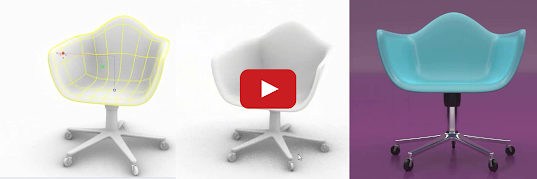
There are dozens of new Rhino 7 features. You might have missed SubD, one of the new modeling tools in Rhino 7. Use SubD to make beautiful organic forms. Check out SubD in this 2-minute video.
Explore other Rhino 7 enhancements for Windows and Mac.
Monday, January 4, 2021
Vintage trike in SubD

Wednesday, December 30, 2020
SubD trellis ring in Rhino 7

Learn how to model a trellis ring using SubD geometry in Rhino 7. Download the associated files for this tutorial. We have more SubD tutorials in Rhino 7 on our Learning to use Rhino page.
Thursday, December 17, 2020

Friday, December 11, 2020
Heart shaped ring

Learn how to model a heart shaped ring using SubD geometry in Rhino 7.
You can download the associated files for this tutorial.
Tuesday, December 8, 2020
SubD fleur-de-lis ring in Rhino 7

Learn how to model a fleur-de-lis ring using SubD geometry in Rhino 7.
Thursday, December 3, 2020
Basic 'push and pull' modeling with SubD in Rhino 7

Explore using the Gumball manipulator and sub-object selection* with SubD geometry in Rhino 7.
*Ctrl+Shift+Click on Windows or Cmd+Shift+Click on Mac. See the Intro to SubD geometry video for more basics as well.
Watch more SubD tutorials here.
SubD flatware in Rhino 7 (speed model)

In this speed modeling video, learn a few ways you can use SubD surfaces in Rhino 7. A spoon and fork are modeled while sharing the same SubD handle geometry.

Subscribe to:
Posts (Atom)
 Subscribe